Schema Markup for Local Businesses: The Smart SEO Shortcut to Better Visibility
Between managing your reputation, local listings, and constant algorithm updates, it’s easy to push technical SEO tasks like local schema markup to the bottom of your priority list. Here’s why you should stop doing that.


If you’re managing marketing for a multi-location brand, your to-do list is likely a mile long.
Between managing reputation, local listings, and constant algorithm updates, it’s easy to let technical SEO tasks like schema markup slide to the bottom of the pile. However, in an era where both traditional search engines and AI discovery tools are fighting for the most accurate data, schema isn’t just a “nice-to-have,” it’s your brand’s digital DNA.
The “What” and “Why” of Schema for Local SEO
Think of schema markup as a translator. While search engines are getting better at reading content, schema provides a structured, explicit map that tells them exactly what your data means. Instead of a search engine guessing that a string of numbers is a phone number or a specific time represents your closing hours, local business schema confirms it.
For multi-location businesses, this is the key to winning the “near me” search. When you provide search engines with structured details about your locations, hours, and customer reviews, you significantly increase your chances of appearing in rich results and the coveted Google Maps Local Pack.
“What is the Local Pack?,” I hear you asking? When someone searches for something with local intent (think “plumber near me” or “best coffee in Brooklyn”) Google doesn’t just show a list of blue links. Instead, it serves up a prominent boxed section at the very top of the page featuring a map and three local business listings. Listings in the 3-Pack get significantly more views and clicks, and some studies suggest they drive up to 93% more user actions like calls, clicks, and requests for driving directions.
Google picks these lucky three based on a mix of
- proximity: how close your business is to the searcher
- relevance: how well your business matches the query
- prominence: how well-known and trusted your business is online
This is exactly why that LocalBusiness schema, that we will discuss shortly, is so important: It’s one of the clearest ways to feed Google the accurate data it needs to decide your business belongs in those top three spots.
Essential Schema Types for Your Multi-Location Strategy
Instead of trying to mark up every single thing on your site, it’s much more effective to focus on the specific local business schema types that actually move the needle for local visibility. Here are the types that help search engines (and AI systems) really understand your business locations.
LocalBusiness
This is the foundational markup for any physical branch, whether you are in healthcare, hospitality, or financial services. It acts as your digital storefront, providing search engines with precise data points like your physical address, geo coordinates, and opening hours.
Why it matters: It helps search engines understand exactly where you are, which is critical for appearing in “near me” searches and Google Maps.
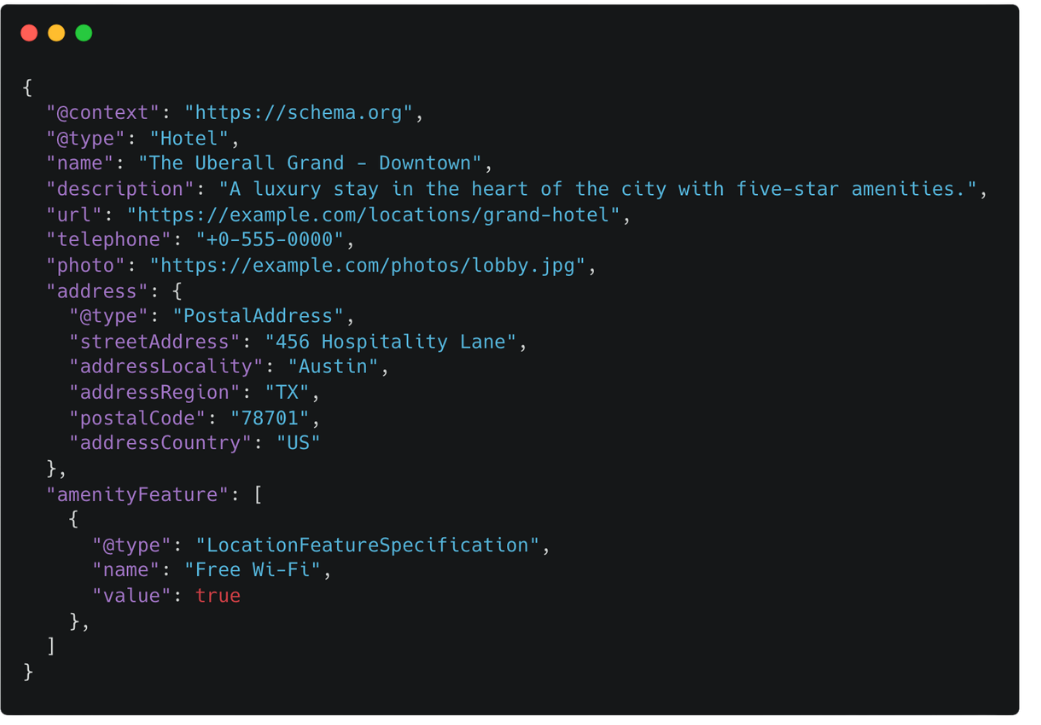
What to include: Use specific subtypes like MedicalBusiness, Hotel, or FinancialService to give search engines and AI systems even more granular context about your industry
Here are some of the most common subtypes used by multi-location brands to stand out.
Organization
While LocalBusiness focuses on the individual branches, Organization schema defines the parent brand. This is where you establish your brand’s authority and link your digital footprint together.
Why it matters: It ensures that when someone searches for your brand name, the information displayed is accurate and consistent across the web. This is especially important after a re-brand, as it serves as your official source of truth for search engines and AI systems, cleaning up your digital footprint and ensuring that outdated listings don’t linger to confuse your customers or dilute your new identity.
For multi-location brands, this acts as the anchor for your entire local strategy. While your individual branches (using LocalBusiness) may change or move, the Organization schema remains the constant that reassures search engines and customers alike that they are dealing with a single, reputable brand.
What to include: Use this to highlight your official logo, social media profiles, and corporate contact information.
.png)
FAQ
FAQ markup is a powerful way to capture more real estate on the Search Engine Results Pages (SERP). By marking up common questions for each location like “Is there parking available?” or “What are your holiday hours?” you can trigger rich snippets that make your listing stand out.
Why it matters: It addresses customer pain points immediately before they even click on your website.
What to include: Keep these answers short and digestible; value is more important than word count.
How to find the questions your customers are actually asking?
- Your receptionists, sales teams, and customer support staff are the real experts on this. They hear the same three to five questions every single day. Whether it is “Where do I park?” for a medical clinic or “Is the pool heated?” for a hotel, these are the concrete examples that reassure customers.
- Mine your Google Business Profile reviews. Look at your reviews and the Questions & Answers section of your local listings. If three different people have asked about wheelchair accessibility or weekend appointments, that is a prime candidate for FAQ schema.
- Check your internal search data. If your website has a search bar, look at the logs. Seeing what people are searching for once they land on your page is a direct window into their intent and their unanswered questions.
.png)
Review/AggregateRating
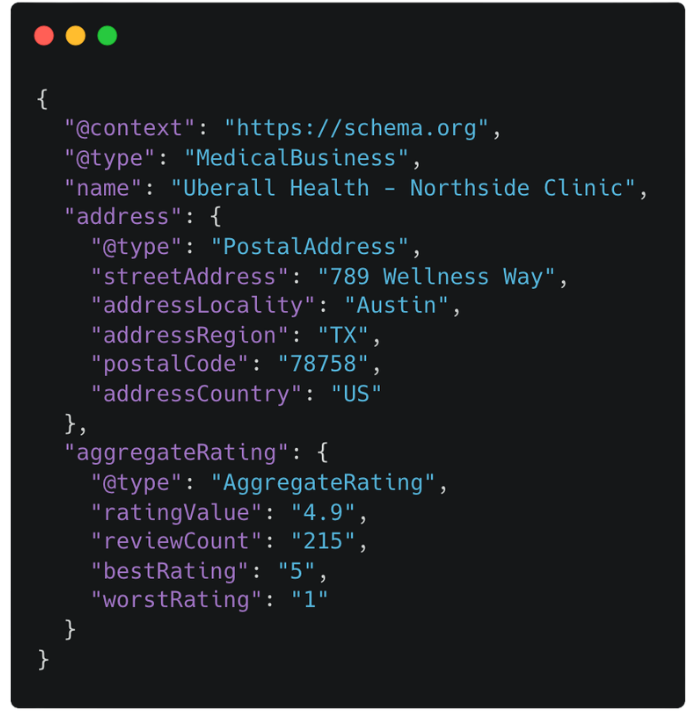
In local marketing, reputation is everything. Using Review or AggregateRating schema allows you to showcase your star ratings and customer feedback directly in search results.
Why it matters: Purely showing your expertise and positive reputation through ratings is often the most effective way to build trust without being “salesy.”
What to include: Only mark up reviews that are actually visible on your page to avoid being flagged for spammy or generic content.
Actionable Steps: From Code to Clicks
Implementing local business schema across hundreds of locations might seem daunting, but it’s about scalability. Start by creating a template for your LocalBusiness markup. Ensure that your NAP (Name, Address, Phone) data is 100% consistent with what appears on your website and your local listings.
Pro-tip: Don’t over-mark your content. One common misconception is that more is always better. Only mark up content that is actually visible to the user on the page, as search engines don’t like hidden data.
Your Schema Maintenance Checklist
Schema isn’t a “set it and forget it” task. Use this quick checklist to ensure your markup remains a value-add rather than a liability:
[ ] Audit for accuracy (weekly): Do the hours in your schema match your actual holiday hours? Inaccurate data is worse than no data.
[ ] Validate regularly (biweekly): Use the Schema Markup Validator or Google’s Rich Results Test to ensure your code is error-free.
[ ] Monitor performance (monthly): Use Search Console to see which pages are triggering rich results and how that affects your traffic.
[ ] Check for deprecated fields (twice/year): Search engines update their requirements frequently; stay on top of new recommended properties.
By prioritizing local schema markup, you aren’t just checking a technical box: You’re empowering your brand to be more discoverable, more authoritative, and ultimately, more successful in the local market.



1,800 brands trust us to stay visible
— not just show up once or twice in local search.